Search

Tech Prabhav

Explore Tech media

Author

techprabhav1234

I'm not a fan of technology. I'm a fan of pedogogy.

How to Change IMEI Number of Android Phone WITHOUT ROOT (MTK Chipset)

Download MTK engineering mode App from play store on your android device.

  • Now, Open the app.
  • Now, select Engineer Mode > Engineer Mode (MTK).
  • Scroll Down & click on CDS Information
  • Select Radio Information.
  • Two options will be there, ”Select Phone 21
  • You will get an option like  AT+
  • Now, enter AT+   (for ex- AT+ 123456789012345 )
  • Select SEND AT COMMAND
  • Restart your Device and you will get your new IMEI for your android device.
  • That’s it.

Secure Your WEBCAM from being hacked//////

Many articles recommend covering the lens of the webcam with a piece of paper to prevent hackers from spying on you. But doing that alone is brushing the real problem under a rug. Having your webcam hacked means your PC has been compromised by some malware, and you need to take immediate action to get rid of it.
Fortunately, here are some easy things you can do that can prevent your computer from being compromised in the first place.

Don’t be click-happy

Hackers lure victims into installing RAT software onto their PC by disguising links, pictures, or email attachments as something desirable, such as free music, movies, or desktop wallpapers. Be wary of suspicious websites that offer similar items. Also be cautious about clicking on shortened links you may find on social media sites.

Equip your computer with an antivirus program and two-way firewall

Having an antivirus and two-way firewall is minimum security any PC should be equipped with. An up-to-date and active antivirus helps to detect and remove malware from infecting your computer. A two-way firewall monitors inbound and outbound traffic to-and-from your computer.

Be cautious of tech support offering remote assistance
Hackers may physically contact you by claiming there are problems with your computer. They’ll try to persuade you to install a program that allows them remote access to your computer, so that they can “fix” the problem. Simply ignore calls from those who claim they are tech support.

Secure your wireless connection

A hacker can easily hack into unsecure Wi-Fi networks with a laptop, antenna, and widely available software. Don’t make it easy for them. Secure your wireless connection with a strong and complex password.

Disable Windows Remote Access

Though most RATs deployed by malware are custom tools, disabling Windows Remote Assistance and Remote Desktop is one thing you can do to prevent hackers from remotely accessing your computer.

To disable Remote Assistance and Remote Desktop for Windows 7, follow these steps:
1. Click on Start and find Computer

2. Right-click on Computer and select Properties
Right-click Computer

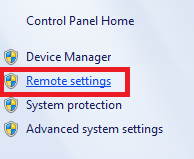
3. Click on Remote settings on the left-hand side
Remote Settings

4a. Under the Remote tab, uncheck “Allow Remote Assistance connections to this computer.”

4b. Under Remote tab, click on “Don’t allow connections to this computer”
Remote Properties

5. Click OK

Are You Being Watched Through Your Webcam??

A few clicks of the mouse, and your webcam is activated and ready to be used. But have you considered the possibility that someone else could be watching you through your own webcam? The thought of this probably sends chills down your spine, and it should, as this is very real- and extremely creepy.

How Webcams Get Hacked
Hackers utilize a type of software called remote access tool (RAT) that allows them to remotely access a computer as if they were physically there. Though RATs were designed for legal purposes, like allowing a technician to remotely access a user’s computer to troubleshoot problems without having to physically be there, hackers exploit this software for their own benefit.

Typically, a hacker lures an unsuspecting user into clicking on a link, opening a picture or email attachment, visiting a specific website, or downloading some software. After the user falls for one of these, the RAT software is secretly installed onto the user’s computer. The hacker now has remote access to the user’s computer.

New Android ‘Switcher Trojan’ infects Wi-Fi routers by changing DNS settings

The virus then redirects traffic from devices connected to the Wi-Fi network to websites controlled by attackers.

A new Android OS virus has been discovered by cybersecurity firm, Kaspersky Lab, and the same is being termed as ‘Switcher Trojan’. The virus infects Android OS powered devices and uses them as tools to infect a user’s Wi-Fi router. It then changes the DNS settings of the router and starts redirecting traffic from the Wi-Fi connected devices to websites controlled and operated by attackers, making users vulnerable to malware, phishing and adware attacks.

What happens is that when an IP address is assigned to a web address, the Switcher Trojan hijacks the process and gives the attackers complete control over the network activity.  This works because Wi-Fi routers usually change the DNS settings of all the devices connected to them, and reconfigure them to their own settings.

According to Kaspersky, “The infection is spread by users downloading one of two versions of the Android Trojan from a website created by the attackers. The first version is disguised as an Android client of the Chinese search engine, Baidu, and the other is a well-made fake version of a popular Chinese app for sharing information about Wi-Fi networks.” The company adds that the rogue DNS planted by attackers also has a secondary DNS as a backup, just in case the ongoing rogue DNS goes down. “The Switcher Trojan marks a dangerous new trend in attacks on connected devices and networks. It does not attack users directly. Instead, it turns them into unwilling accomplices: physically moving sources of infection. The Trojan targets the entire network, exposing all its users, whether individuals or businesses, to a wide range of attacks – from phishing to secondary infection. A successful attack can be hard to detect and even harder to shift: the new settings can survive a router reboot, and even if the rogue DNS is disabled, the secondary DNS server is on hand to carry on. Protecting devices is as important as ever, but in a connected world we cannot afford to overlook the vulnerability of routers and Wi-Fi networks,” said Nikita Buchka, mobile security expert, Kaspersky Lab.

The company warns that all users should check their DNS settings and search for the following rogue DNS servers:

  • 101.200.147.153

  • 112.33.13.11

  • 120.76.249.59

If any of these servers are found in DNS settings, then it is recommended that users contact their Internet Service Providers and change login IDs, passwords

window.__insp = window.__insp || []; __insp.push([‘wid’, 2112964921]); (function() { function ldinsp(){if(typeof window.__inspld != “undefined”) return; window.__inspld = 1; var insp = document.createElement(‘script’); insp.type = ‘text/javascript’; insp.async = true; insp.id = “inspsync”; insp.src = (‘https:’ == document.location.protocol ? ‘https’ : ‘http’) + ‘://cdn.inspectlet.com/inspectlet.js’; var x = document.getElementsByTagName(‘script’)[0]; x.parentNode.insertBefore(insp, x); }; setTimeout(ldinsp, 500); document.readyState != “complete” ? (window.attachEvent ? window.attachEvent(‘onload’, ldinsp) : window.addEventListener(‘load’, ldinsp, false)) : ldinsp(); })();

Opinion: The Tech Industry’s Dark Truth Because sometimes you need to break the silence…

Because sometimes you need to break the silence…………

Each year, the tech industry brings forth new, innovative devices. This year in technology saw some fierce competition between the incumbent tech stalwarts and the firebrand new entrants in the field. Tech journalists like us had a ball reviewing everything from smarter phones to hybrid laptops, AI powered digital assistants, apps, IoT devices, cameras and more. For you, the reader, the tech circle of life starts with such launches and ends with the product of your choice in your hands and at your homes. Somewhere in the middle, people like us, try our best to get you useful facts and figures, to help you make an informed decision. The wiser our research, the better the content and the more knowledgeable your decision. One would think this is an ideal process. A fair process. But is it really that?

The competition (has) heated up the consumer debate, leaving them with a choice between a barrage of similarly specced and priced gadgets

To understand where I’m coming from, you have to know the fragile, yet amicable relationship tech journalists and marketers maintain. It’s a give and take relationship, like any other. One would think that in this case, it’s a scoop or a relevant piece of information shared by the latter with former. Pretty straightforward, right? Wrong. The competition in the tech industry has not only heated up the consumer debate, leaving them with a choice between a barrage of similarly specced and priced gadgets, it has also left the handful of true-to-their word tech journalists in a lurch.

Over the past few years, the tech marketing and PR industry has seen a sea change in its core functionality. Those who would once be a bridge between reviewers and companies, are now the very torch-bearers of information, that should ideally be freely available to the likes of us. It’s sad that I have to generalise for the sake of this piece, but I am doing so in order to protect certain sources, who still have the gall to admit to this racket. A racket where lists of the so called “unbiased” and “credible” journalists is maintained by marketing whiz kids. These are the ‘go-to’ people, those that without an afterthought of the consumer impact, churn out articles written in flowery language, promoting anything and everything in the consumer tech space. These practices have given rise and fame to a barrage of unscrupulous blogs, maintained with a single objective of pushing out unfair content, content that pays its dues to tech companies that are looking to influence your buying decisions. This is misinformation at its best and it’s happening not just here in India, but worldwide.

“Those who would once be a bridge between reviewers and companies, are now the very torch-bearers of information, that should ideally be freely available”

Think of it in this way. The Indian advertising rules don’t allow for false or misleading advertisements. Ads that use exotic language, without a relevant explanation. If this was practiced in the tech world, most of us would be found guilty of malpractice. For instance, if I were to say, “This laptop is the best the market has to offer, it’s a competition-killer and you can’t do better than this,” I better have conducted a relevant test to have come to this conclusion. That is so not the case in this industry. While there a few still sticking to their quixotic journalism teachings, there are hundreds who ride on the back of positive, or worse, neutral content, aiming to have a long lasting, mutually beneficial relationship with tech companies and their marketing posse. Many articles found on popular tech blogs and publications claim original thought, but are actually paid for. This circle becomes murkier when those with a genuine, scientifically provable opinion are pushed to the very end of the priority line by companies that can’t seem to get enough affirmation of their success.

In many cases, there is no room left for constructive criticism. Criticism that can eventually contribute towards the betterment of technology and its impact on the consumer. I am not saying that all tech manufacturers resort to these awful tactics, but there are enough who do. There is an inherent loss of faith in hard-bred journalists, who at one point had actual inputs to share with technologists. In the good old days, a sense of mutual respect and admiration prevailed. it is lost to us now.

Fact-checking is another myth in this industry. Possibly a result of the poor situation we find ourselves in, facts are no longer cross checked. Take for instance a recent news event wherein multiple big-ticket tech publications reported BSNL, the Indian telecom service provider, was to launch a plan offering 20GB of 3G data for as low as Rs. 50. The news, although not as significant as an iPhone launch, went viral in the country thanks to hundreds of articles that seemed to know all about these plans. A little voice in me told me this seemed questionable, and I was fortunate enough to have picked up the phone and get an official word discrediting any such offers. This is not a drum that I would proudly beat, because this is something I would have expected all my peers to do. Afterall, looking beyond the words is our job. Sadly, we have failed to look beyond our means.

Fact-checking is another myth in this industry

For the companies that promote such practices, my beef is not only with you. It is a well known fact that the media industry, like any other, answers to corporate bosses. My problem is with those who took your money and gave you more than the deal’s value. They gave you their honesty and their credibility, and in the bargain, betrayed the consumer’s trust.

Taking an excerpt from something I wrote a while ago, I know I may sound like an idealistic fool, but better the fools who can walk tall than the tall who have a long road of shame ahead of them.

For you, the consumer, my only advice is to not blindly trust everything you see and read. Unfortunately, in this day and age, one has to perform one’s own due diligence. As for the rest of us, there is little hope of things changing. When the success or failure of a technology starts depending on who hires the most cut-throat marketing agency, rather than the technology’s actual merit, things start to fall into a deep dark pit. All we can hope to do is swim and churn the milk into butter.

What Should I Do If My Gmail Account Was Hacked?

You sign into your Gmail account, and something feels off. You may notice some emails missing, or emails that aren’t yours (spam, perhaps?) in your “Sent” folder. And you’re asking yourself, “could it be that my Gmail account was hacked?” Considering that today, 1 in 4 online accounts gets hacked, that possibility isn’t entirely out of the question.

Update: Just recently, the world was up on its feet over reports stating that almost 300 million different online account logins and passwords were compromised and have been traded by a group of Russian cyber criminals.
More than 24 million login credentials that were compromised belong to Gmail account holders, and it was reported to be one of the largest cyber attacks in the recent years.

If you suspect your Gmail account has been hacked, but you still have access to the account, here’s what you can do:

1. Before you start find and delete all the compromising info in your inbox

Time is of the essence. Take the necessary precautions to protect your inbox. Use this free tool to find exposed passwords, credit card, bank and social security numbers in your email account. This tool will remove any and all private data putting you at risk for credit card and identity theft. So if hackers hack your inbox, they won’t find what they’re looking for.

2. Check the latest logins

In Gmail, scroll down to the bottom of the page and click the “Details” link at the bottom right.

Gmail Account Hacked – Check the latest logins

A new window will open with a list of last activity on your account. Check out the details listed under Access Type (which will indicate how your account was accessed, e.g., browser, mobile, etc.), Location and Date/Time. If you see any activity listed there that doesn’t match your own activity, that may be an indication that your account was indeed hacked.

Gmail Account Hacked – Latest Activity

3. Change your password

Go here and change your password.

You’ll better protect your account from hackers if you choose a complex password that includes lowercase and uppercase letters and at least one number. If possible, add special characters like a hash or exclamation point. Make sure your new password is at least 8 characters long, and avoid using dictionary words. You might also consider using a password manager app to make it easier to manage your passwords. Here are some suggestions on 6 top password managers.

Gmail Account Hacked – Change your password

4. Check your password recovery options

Go over the account recovery e-mail and phone number on your account page and verify they were not changed.

For good measure, change the security question and answer, just in case the attacker was able to crack them. You should also verify that the recovery e-mail account wasn’t breached, as attackers often use one compromised e-mail to gain access to another.

Gmail Account Hacked – Password Recovery

5. Check other account characteristics

Go to your Gmail settings page. Under the General tab, verify that your “Signature” and “Vacation responder” settings were not changed. Under the Accounts tab, make sure the “Send mail as” setting wasn’t changed.

Gmail Account Hacked – Settings

Under the Filters tab, verify that filters haven’t been added, especially of your bank or other legitimate online service providers. Attackers often access a victim’s e-mail account to add these filters in order to disable notifications of money transfers and the like.

To verify that no one is forwarding your e-mail, go to the Forwarding and POP/IMAP tab and verify that a forwarding address hasn’t been set up.

Gmail Account Hacked – Email Forwarding

6. Check your other accounts

If you reuse the same password with other online accounts such as Facebook or Evernote, change the passwords on these accounts immediately. Attackers often use password reuse (an ill-advised but common practice) to gain access to more of the victim’s accounts. Check out how such silent attacks really work.

7. Run an antivirus scan on your computer

Often times, attackers gain their victims’ passwords using Trojan horses that were installed on the victims’ computers. If your machine is infected, changing the password will not help, as the malware will capture the new password and send it to the hacker. For this reason, be sure to run an antivirus scan on your computer to rid your machine of any infections. If you don’t already have an antivirus program, check out these suggestions for Best Free PC Antivirus Software.

8. Activate two-step verification

To further secure your account, enable two-step verification by going here.

With two-step verification, Google will require that you enter a unique code that will appear on the “Google Authenticator” app on your mobile, providing you with an important and effective extra layer of security. You can use a “Remember me” option to disable this step for any device, such as your laptop or smartphone, that you use regularly, which will maintain this extra security layer only on unknown devices.

Gmail Account Hacked – Two-step verification

What Do I Do If My Password Was Changed?

If you are unable to log into your e-mail account, open this form and select “I’m having other problems signing in” to try recover your Gmail account.

Think there’s a chance a hacker also got into your Facebook account? Check out our guide on What To Do If Your Facebook Was Hacked.

What Can You Do To Protect Your Accounts And Personal Information Today?

Perhaps now more than ever, it’s crucial to take a hands-on approach regarding your privacy and the security of your personal data and online accounts (Gmail, Facebook, Dropbox, etc.). Fortunately, you can use a number of freely available tools to help better protect your personal information. Here are a few suggestions:

Get LogDog, a free anti-hacking app. It protects your personal data and valuable accounts (Gmail, Facebook, Dropbox and more) and alerts you to any suspicious activity so you can take control of your account before a hacker does. The service can be used across all devices and OS’s, so you’re always being protected. Here’s the Android and iOS links for you to check out.
Get an antivirus solution for both your PC and phone. Check out these recommendations for the Best Free PC Antivirus Software and 8 Best Mobile Antivirus Apps For Android and iOS.
Never reuse the same password across multiple online accounts, and always make sure you use strong passwords that include letters, numbers, and at least one symbol. To keep track of your passwords and keep them safe and secure, use a password manager like LastPass or True Key.
Use two-factor authentication on all of your accounts to enhance security.

When you lose your Android device………….. then do this to detect your device…

When you lose your phone or it gets stolen, it almost feels like the world has come crashing down, doesn’t it? Our lives depend on our phones through our contacts, passwords and applications. The only worse thing that could happen is your stolen device landing in unwanted hands. This is a big issue for all Android users in general. However, there are certain applications now that can help you locate your stolen phone using GPS SAT-NAV or even wipe off all your data remotely. Here are some measures you can take in case you lose your Android device

1. Wipe your data

In case your phone gets stolen and you are certain you are not getting it back, you must erase your data immediately using a remote data wipe mechanism.

You can follow the following procedure as it is mentioned on the Google official forum:
“Select Remote Wipe when a device is lost or stolen to erase all data on the device and to do a factory reset. You can remote wipe an Android device with the Google Apps Device Policy app installed and any supported mobile device with Google Sync configured. All data is erased from the device (and SD card, if applicable), including email, calendar, contacts, photos, music, and a user’s personal files.

Note that Remote Wipe erases the device’s internal storage. Your user’s device must already have Device Policy (or Google Sync) configured. You cannot install Device Policy and run Remote Wipe retroactively. For Android 2.3+ devices, Remote Wipe also erases the device’s primary SD card”

Plus you won’t have to feel bad about having to erase all this priceless data if you have followed our advice and have taken a cloud backup of your device. A little bit of planning goes a long way.

2. Remote Track your lost phone

If you lose your phone and want to track it using some other Android device, you can either use applications like AVG security system or you can download additional apps like Find My Phone for Android to track its location using GPS.

You can even do this without any extra application as well. You just need to have a Google account and your Android device must be connected to internet. Any Android device is equipped with a tool called ADM (Android Device Manager) which can be used if all the above conditions are met. Simply Google “Where is my phone” and your phone’s location shall be displayed on Google maps. It works most of the time, just be sure that ADM is activated on your device.

Be sure to diagnose any problem your phone and take measures in case it is acting up

Conclusion

Last but not the least, make sure your phone is always safe with you and stay cautious about pickpockets. Smartphones are an integral part of our lives and now you are equipped with the knowledge to fend off hackers and malicious attacks targetting it. Android security options combined with the above tips and sufficient caution – that’s how you secure your Android smartphone.

Is Your Network At Risk Of Hackers……?

You’ve secured your office network with the best of hardware and software layers to ensure it is safe from the prying eyes of a hacker. But, is there a weak link in that security chain? Well, the humble printer might just be the next target and the impact can be catastrophic. Let us explain………………..
With traditional vulnerability points in an enterprise network becoming increasingly challenging to hack, the next wave of break-in attempts might stem via the most unexpected source. In fact, it’s already happening. The question is, are you guarded against it?

Nobody ever suspects the office printer. Fifty-six percent of enterprise companies leave printers out of their security strategy. Research conducted by the Ponemon Institute reported that 60 percent of companies surveyed had a data breach involving printers, requiring an average of 46 days to resolve a cyberattack. In another survey, 80 percent of companies indicated that IT security is important to business processes; but just 59 percent of those companies stated that print security was important to them.

Here are five ways print security risks can unleash some serious damage to your business

Compromised network

Even behind the firewall, many devices on a network may create a new access point to the entire network. When printers are overlooked in a comprehensive network security plan, that point of entry can be very welcoming to hackers, who can cause catastrophic consequences once inside the network.

When a hacker takes-over an unsecured printer

When hackers gain access to unsecured printers, they wield all the power for destruction. Your printer could become a possessed machine, printing random jobs, transmitting foreign faxes and changing all of its settings. Printers are also prime targets of denial-of-service (DoS) attacks.

Data breaches

Unencrypted print data is a hacker’s dream. If data transmitted to a printer is unencrypted, it shows up as clear, legible text. If hackers want access to this data, it can be captured and read using a standard PRN reader.

Unattended print jobs

Abandoned printouts can sit for days in the printer’s document tray or end up littering the copy room. Nosy employees can sneak off with confidential information inadvertently left behind. This information leak also makes a company liable for regulatory compliance failures.

Access to mobile devices complicates it further

As computing devices on the network expand to include mobile devices, it is more challenging to provide network authentication and secure access to printers. Even if the printer is on a secure network, the mobile device might be compromised, creating potential back-door opportunities for a hacker.

Imaging and printing vulnerability points

Getting started with print security: Protecting your business against such threats require a 360 approach towards security, ensuring there are no loop holes left open for a potential exploit. However, here are a few guidelines that can go a long way towards protecting you from vulnerabilities around print security.

Make sure that computing devices use only encrypted communication protocols, and disable unused ports and protocols on the printer.
Put a system in place that erases or destroys the printer’s hard-drive data as part of removing the device from circulation.
Support at least one form of user authentication (preferably two or three), and consider the implementation of pull printing for print environments with a high volume of confidential information or compliance requirements.
Ensure printer firmware is current and only legitimate firmware is ever loaded.
Use a fleet management tool to centrally manage, monitor and remediate devices to ensure compliance with security policies.
Make sure all data between both desktop and mobile devices is encrypted to be certain the print-related data is fully protected from man-in-the-middle attacks.
Engage a security consultant. Don’t be afraid to tap experts when there are gaps in your staff’s knowledge about certain issues. Printer security experts can help you create a strategy that works for you.
Conduct an assessment. Is your company really at risk, and to what degree? Assess your current security measures to see if they’re up to scratch. Take this free survey to see where your weaknesses may lie.
Develop a plan. Help secure your print fleet and schedule necessary appraisals and evaluations to keep that plan actionable as technology, and the hackers who want access to it, evolves.
Read more about HP’s secure printing solutions to find out how you can deploy the most adequate print security strategy for your office network.

A WordPress.com Website.

Up ↑

Tech Prabhav

Explore Tech media

Discover WordPress

A daily selection of the best content published on WordPress, collected for you by humans who love to read.

The Daily Post

The Art and Craft of Blogging

WordPress.com News

The latest news on WordPress.com and the WordPress community.

Design a site like this with WordPress.com
Get started