Search

Tech Prabhav

Explore Tech media

Reliance Jio partners with Niantic to finally bring Pokemon Go to India officially.

Reliance Jio has announced that it is partnering with the developers of Pokemon Go, Niantic, to bring the game to India. As part of the partnership, thousands of Reliance Digital Stores and select partner partner premises in India will appear as PokeStops or Gyms starting from December 14. Further, Pokemon trainers on JioChat will have access to an exclusive POkemon Go channel. The channel will enable trainers to collaborate and have access to daily trips, contests, clues, and special events.

Read the complete press release below

Reliance Jio Infocomm Limited (“Jio”) delights Indian gamers by bringing the sought-after, first-of-its-kind, Augmented Reality game ‘Pokémon GO’ to India in a partnership  with Niantic, Inc. – publisher and developer of Pokémon GO in association with The  Pokémon Company. With this partnership, thousands of Reliance Digital Stores and select partner premises in India will appear as ‘PokéStops’ or ‘Gyms’ in the Pokémon GO game beginning Wednesday, December 14, 2016.

This launch is in line with Jio’s mission to empower Indians with opportunities that are fuelled by the power of data and a Digital Life and to delight them on an ongoing basis with entertainment-based apps, such as ‘Pokémon GO,’ the leading app in the gaming category.

“We are delighted to partner with Jio to launch Pokémon GO in India.” said John Hanke, Chief Executive Officer and founder of Niantic. “It’s exciting to see Pokémon fans in India step out and explore their neighbourhoods in search of Pokémon and Jio’s disruptive high speed 4G LTE Network will be an excellent way to experience the game.”

The two companies will work together to bring Indians a richer and more enjoyable mobile entertainment experience for Pokémon GO, including activating Jio retail locations and charging stations as PokéStops and Gyms within the game and allowing Indians to catch, train, and battle at any of Jio’s outlets throughout the country.

On Jio’s social messaging app, JioChat, Pokémon players have access to an exclusive Pokémon Go Channel. The Pokémon Go Channel will enable Pokémon Go players to collaborate and be part of an exciting community of players with daily tips, contests, clues, and special events. The Pokémon Go Channel on JioChat a fun way to socialize with other players and level-up faster.

“With over 500 million downloads globally, we are excited to launch Pokémon GO officially in India on the Reliance Jio network,” said Mathew Oommen, President Reliance Jio. “Our partnership with Niantic not only brings access to the Pokémon GO app but also opens the door to more opportunities for our customers to enjoy content on Jio’s one-of-a-kind mobile broadband network.”

The partnership puts Pokémon GO players on a world-class all-IP data strong network, and during the Happy New Year Offer, Jio SIM customers will be able to download and play Pokémon GO without incurring data charges, like any other apps and content, till 31st March 2017.

2016’s biggest controversies in tech……

At the end of each year, we at Digit take stock of the bygone 365 days in technology. Now, we are just a few days shy of calling it a new year and from some of the biggest stories, to the smartest gadgets, we have already recounted many glorious moments of 2016. But, not everything was hunky dory in the industry, riling up public opinion and putting the lense on some of the biggest names in tech. What caused dispute and who earned the wrath of critics? Here are 2016’s biggest controversies in tech.

The Facebook bias

Facebook, everyone’s friendly neighborhood social media network, was accused of feeding biased information through newsfeeds and trending topics on the platform. The controversy erupted when a group of journalists from Tech blog, Gizmodo, alleged that the social network told them to suppress news related to conservative parties. This led to an eventual US Senate inquiry where Facebook was found using certain websites for feeding its news algorithms. Facebook eventually amended its algorithms and acknowledged possible “isolated improper actions or unintentional bias”.

The Samsung Galaxy Note 7 Fiasco

No tech tale of 2016 will be told without a mention of the Samsung Galaxy Note 7 bust, or shall we say burst! Till date, there is no conclusive explanation as to why the Galaxy Note 7 batteries were exploding worldwide. Leading all the way up to a class action lawsuit, bricks of moolah from Samsung’s pocket, and hundreds of disgruntled (or in many cases physically hurt) customers, the Galaxy Note 7 fiasco definitely earned a seat at the table with the most controversial tech stories of 2016. The company eventually recalled the device, which is currently in its last few remains.

The Apple-FBI Clash

Apple and FBI locked horns over privacy and security of iOS devices and sparked one of the biggest tech debates in 2016. The issue arose when FBI asked Apple to give it a peek into an iPhone that belonged to a terrorist involved in the San Bernardino case. Tim Cook took a firm stand for encryption and data security, warning of an eventual hole in user privacy for time to come. The FBI eventually hacked into the controversial iPhone 5C on its own accord and without Apple’s assistance. Did Apple win the battle and lose the war?

The Twitter CEO expulsion

No, not from the company, but from the microblogging platform itself. In a hilarious “internal error” Twitter deleted the account of its own CEO, Jack Dorsey, thereby also deleting his 3.9 million followers. The matter resulted in public outrage over accidental account deletions by Twitter, and it became the subject of a very sensational debate. Dosey’s account was later reinstated and his followers restored. Twitter may have managed to shove this controversy under the rug, but the company is now struggling to find buyers for its business. It is well known that Twitter is up for sale, but the the company has been tight-lipped about it. However, with potential buyers Disney and Salesforce backing out of the bids, it seems like Twitter’s declining popularity and low profits are to blame.

The Samsung factory revelations

Technology stalwart Samsung was accused of withholding information from its South Korean factory employees, about the hazardous effects of chemicals used in their chip and display manufacturing facilities. This information came to light with a supporting investigation conducted by the Associated Press. Workers in Samsung’s South Korean factories reported numerous health problems due to chemicals used during various processes of manufacturing chipsets and displays and some even suffered loss of life. Turns out, Samsung had asked authorities not to disclose information on the chemicals used in its factories, stating “trade secrets” as a reason. Whatever happened to that investigation?

The end of BlackBerry smartphones

The underwhelming reception of the BlackBerry Priv was the last straw for BlackBerry, which announced that it will not be making smartphones anymore. Does this mean BlackBerry phones are dying? Well, not really. While the company may have said it will not make smartphones anymore, it also announced that third parties may manufacture BlackBerry branded phones, while the company concentrates on the software side of things. True to their word, the recently launched BlackBerry DTEK50 and DTEK60, are manufactured by TCL, and have so far failed to make an impression, one that BlackBerry phones used to command back in the day.

The forced Windows 10 upgrades

When Microsoft decided to skip 9 and go to Windows 10, it was a controversy of its own. This year, the Redmond-based software company caused widespread dissention with its forced Windows 10 upgrades. With upgrade notifications the size of an entire desktop screen, Microsoft faced the wrath of its customers, who didn’t appreciate this overwhelming push to switch over to the latest OS. The company even force-installed the update on a woman’s PC, resulting in a lawsuit and an eventual $10,000 settlement. The company mended matters by making it easier to decline Windows 10 updates and that was the end of this controversy.

The Google EU antitrust case

Google was, and continues to be, in a long drawn battle with the European Union and its antitrust charges. EU had previously accused the search giant of unfairly promoting its shopping services, and intentionally blocking out rival online search ad services. Now, 6 years from the time it was accused, Google has finally responded to the allegations, formally denying any wrongdoing. Meanwhile, the EU has been building its case with more evidence. In a recent blogpost, Google’s General Counsel wrote, “We never compromised the quality or relevance of the information we displayed. On the contrary, we improved it. That isn’t ‘favoring’ – that’s listening to our customers.” It will be interesting to see how this plays out in 2017.

The 251 rupee mistake

It’s what you made, when you booked the Rs. 251 ($3.7) smartphone, Freedom 251. No one could fathom how cheap this phone was, and that it was made by an Indian company, was all the more scintillating. So much so, that the price of the smartphone seemed too good to be true and resulted in an investigation from the Indian Department of Electronics & Information Technology. Somehow, Ringing Bells, the company behind the phone, managed to scrape through the controversy and even announced a second product, the Freedom TV. A fresh rumour of the company shutting shop also surfaced recently, but for now, Ringing Bells has denied any such plans.

The Reliance Jio effect

This year, Reliance Jio, the firebrand telecom entrant in India announced free unlimited voice calls for life along with free 1GB data per day. The deal crazy Indian lined up outside Jio stores, resorting to bribing and blackmailing, just to get that coveted SIM card. Giving incumbent telecom operators such as Airtel, Idea, Vodafone a run for their money, Jio fought a long drawn battle for fair competition, a war on mobile number portability and then some. Now, a few million call drops later, Jio continues its journey to the top thanks to a regulatory nod for its free-calling services and an extended free data offer. Will it be a Happy New Year for Jio? Let’s wait and watch.

The Security conundrum

Lastly, 2016 proved to be a dark spot for cyber security. The year saw multiple large-scale hacks come to light. Q2 2016 saw a whopping 129% year-on-year increase in DDoS attacks and two of the biggest DDoS attacks in history happened this year, threatening the very foundation of the internet. Internet security and the security of Internet of Things devices is one of the biggest debates of 2016 and it surely doesn’t show any signs of resolution just yet. Considering the way such attacks are frequenting, 2017 could see an all time high insecurity breaches.

How to undo sent E-mail in gmail??

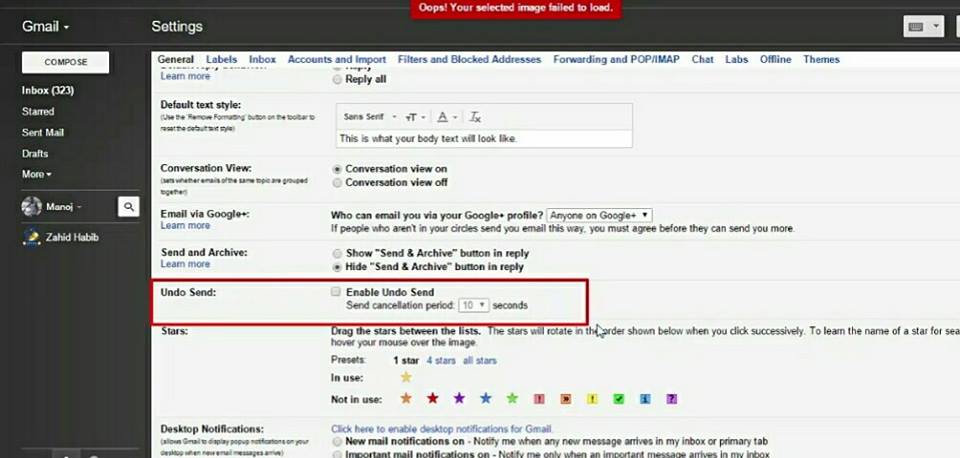
Welcome guys, today is my first post i am  sharing a trick which may be very useful to you. Many of the times the email was send by-mistake, but as the mail send by will not stop from delivering to the receiver. So, if guys you want the send mail back from receiver or stop delivery to the receiver, then do the few steps listed below:

step 1: Go to setting option in G-Mail which is present at the right on top .
step 2: Then , the setting dialog box will open then the ENABLE UNDO SEND is shown there tick the option
step 3: Save changes.
That all you have to do to recover you message or your mistake😆

Featured post

How to Build Security Into the QA Cycle??

These days, many companies are developing software with fairly rapid release cycles of every week or even every few days. Thus, testing software security no longer looks like it used to. Spending several days or more analyzing the code for bugs is not viable. Security teams need a better way.
First, a primer on how to secure web apps in development. Broadly speaking, there are three stages to security quality assurance: code review, static application security testing, and dynamic application security testing.

Code review.
Everyone should do security code review near the end of the development process. A checklist and established process enable teams to adhere to basic coding security practices. Since most teams do some form of code review already, reusing this existing process to add security assurance tends to be an easy win.
Static application security testing (SAST) has become the conventional first step of automated quality assurance. It is critical to review the finished software for defects or vulnerabilities that humans cannot find.
Dynamic application security testing (DAST) of the completed software is the third level of maturity. This can be automated or can involve human intervention. DAST helps focus code review and SAST on vulnerabilities that are exploitable in the real world and can detect logic errors and design flaws that are difficult to spot by looking at code.
The problem with using just these three traditional assurance techniques to ensure your completed apps are secure is that they are designed for a traditional software model of releasing or updating software in big quarterly or annual releases. At that cadence, there are plenty of days or weeks to run this assurance, find defects, and fix them.

For modern Agile technology development, it is simply too much effort to invest two weeks of preparation and setup to test software you are releasing and/or updating every week or two (or every day).

In addition, while these tests are important, none of them is a magic-bullet solution that reveals all the problems with the software or enables you to find and remediate them. SAST can report thousands of results of which only a small percentage are valid and need to be fixed, which means that you need to find the needle in the haystack. DAST is not guaranteed to provide insight and pen testing is expensive and not comprehensive. These tools are all part of a complete solution, but none of them is complete in and of itself.

RASP
Faced with these challenges, runtime application self-protection (RASP) can make a real difference. RASP protects your software from the inside all the time. It can protect apps while you are working on security QA, steps two and three. This technology enables you to run testing in the background after you’ve already released the app because you know it is protected in the interim. It can find vulnerabilities, notify you, and tell you where the problem is so you can fix it. In the event of a vulnerability in web apps that you’ve already sent out to the market, RASP brings your risk close to zero by preventing vulnerabilities from being exploited. You can release apps as fast as your developers can ship code, and be confident that a minor mistake won’t lead to all your sensitive data winding up on Pastebin.

Don’t Use Your Antivirus’ Browser Extensions: They Can Actually Make You Less Safe………….

Most antivirus programs–or “security suites”, as they call themselves–want you to install their browser extensions. They promise these toolbars will help keep you safe online, but they usually just exist to make the company some money. Worse yet, these extensions are often hideously vulnerable to attack.

Many antivirus toolbars are, at best, just rebranded Ask Toolbar extensions. They add a toolbar, change your search engine, and give you a new homepage. They may brand it as a “secure” search engine, but it’s really just about making the antivirus company money. But in some cases, they do more than that–and sometimes with unintended consequences.

Example 1: AVG Web TuneUP Broke Chrome’s Security

“AVG Web TuneUP” is installed when you install AVG antivirus. According to the Chrome Web Store, it has nearly 10 million users. AVG’s official description of the extension says it will “warn you of unsafe search results.”

Back in December, Google-employed security researcher Tavis Ormandy discovered that the extension adds a large number of new JavaScript APIs to Chrome when it’s installed and that “many of the APIs are broken.” Aside from exposing your entire browsing history to any website you visit, the extension offered many security holes for websites to easily execute arbitrary code on any computer with the extension installed.

“My concern is that your security software is disabling web security for 9 million Chrome users, apparently so that you can hijack search settings and the new tab page,” he wrote to AVG. “I hope the severity of this issue is clear to you, fixing it should be your highest priority.”

Four days after it was reported, AVG had a patch. As Ormandy wrote: “AVG submitted an extension with a “fix”, but the fix was obviously incorrect.” He had to provide instructions for how to fix this flaw, and AVG issued an updated patch a day later. The fix restricts the functions to two specific AVG domains, but, as Ormandy noted, the websites on those domains have their own flaws that opens users up to attack.

Not only did AVG ship a browser extension with obviously broken, shoddy, insecure code, but AVG’s developers couldn’t even fix the problem without having their hands held by a Google security researcher. Hopefully, the browser extensions are being developed by a different team and the real experts are working on the antivirus software itself–but that’s a good example of how those antivirus browser extensions can go from useless to harmful.

Example 2: McAfee and Norton Don’t Think Microsoft Edge Is Secure (Because It Doesn’t Support Their Add-On)
mcafee-webadvisor-edge-protection-warning

If you’ve been following the development of Microsoft Edge for Windows 10, you’ll know that it’s supposed to be a more secure web browser than Internet Explorer. It runs in a sandbox and abandons support for old, insecure plug-in technologies like ActiveX. It has a more streamlined codebase and a variety of other improvements, such as protection against “binary injection,” where other programs inject code into the Microsoft Edge process.

And yet, McAfee–which is even installed by default on many new Windows 10 PCs–really doesn’t want you to use Microsoft Edge. Instead, McAfee recommends you use Internet Explorer, and will helpfully remove Edge from your taskbar and pin Internet Explorer there if you let it. All so you can keep using the McAfee browser extension.

Even if that browser extension helped keep you secure a little bit–something we don’t really believe–you’d be much better off with the improved security in Microsoft Edge. Norton does something similar, recommending you use a “supported browser” like Internet Explorer on Windows 10.

Thankfully, Microsoft Edge will soon support Chrome-style browser extensions. And when it does, McAfee and Norton can force their browser extensions on Edge users and stop redirecting them to the old-and-out-of-date-IE.

Example 3: Avast’s Online Security Extension Once Included Ads and Tracking

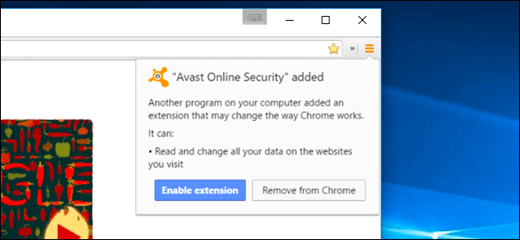
Here’s one we’ve covered before: Avast installs an “Avast! Online Security” browser extension when you install the main security suite, and they later added a feature named “SafePrice” to the extension in an update. This feature was enabled by default, and it displayed online shopping recommendations–in other words, ads that presumably make Avast money when you click them–as you browse.

To do this, it assigned you a unique tracking ID and sent every single web page you visited to Avast’s servers, associated with that unique ID. In other words, Avast tracked all your web browsing and used it to show ads. Thankfully, Avast eventually removed SafePrice from its main browser extension. But antivirus companies clearly see their “security” extensions as an opportunity to dig deep into the browser and show you ads (or “product recommendations”), not just a way to keep you secure.

It’s Not Just Browser Extensions: You Should Disable Other Browser Integrations, Too

Extensions are just part of the problem. Any form of browser integration can create security holes. Antivirus programs often want to monitor all your network traffic and inspect it, but they can’t normally see what’s happening inside an encrypted connection, like the one you use to access your email, or bank, or Facebook. After all, that’s the point of encryption–to keep that traffic private. To get around this limitation, some antivirus programs effectively perform a “man-in-the-middle” attack so they can monitor what’s actually going on over an encrypted connection. These work an awful lot like Superfish, replacing certificates with the antivirus’s own. The MalwareBytes blog explained avast!’s behavior here.

This feature is generally just an option in the antivirus program itself, and not part of a browser extension, but it’s worth discussing all the same. For example, Avast’s SSL-interception code contained an easily exploitable security hole that could be used by a malicious server. “At least get an intern to skim your before shipping it,” tweeted Ormandy after discovering the problem. It’s one of those bugs that Avast, a security company, should have caught before shipping it to users.

As he argued in following tweets, this sort of man-in-the-middle code just adds more “attack surface” to the browser, giving malicious sites another way to attack you. Even if the developers of your security program are more careful, features that tamper with your browser are a lot of risk for not much reward. Your browser already contains anti-malware and anti-phishing features, and search engines like Google and Bing already attempt to identify dangerous websites and avoid sending you there.

You Don’t Need These Features, So Disable Them
img_56a2c8a932c54

Here’s the thing: even barring the above issues, these browser extensions are still unnecessary.

Most of these antivirus products promise to make you more secure online by blocking bad websites, and identifying bad search results. But search engines like Google already do this by default, and phishing and malware page filters are built into Google Chrome, Mozilla Firefox, and Microsoft’s web browsers. Your browser can handle itself.

So whatever antivirus program you use, don’t install the browser extension. If you already installed it or weren’t given a choice (many install their extensions by default), visit the Extensions, Add-ons, or Plug-ins page in your web browser and disable any extensions associated with your security suite. If your antivirus program has some sort of “browser integration” that breaks the way basic SSL encryption is supposed to work, you should probably disable that feature too.

Interestingly enough, Ormandy–who’s found a variety of security holes in many, many different antivirus programs–ends up recommending Microsoft’s Windows Defender, stating that it’s “not a complete mess” and “has a reasonably competent security team.” While Windows Defender certainly has its flaws, at least it doesn’t attempt to insert itself into the browser with these additional features.

Of course, if you want to use a more powerful antivirus program than Windows Defender, you don’t need its browser features to stay secure. So if you download another free antivirus program, be sure to disable its browser features and extensions. Your antivirus can keep you safe from malicious files you might download and attacks on your web browser without those integrations.


A WordPress.com Website.

Up ↑

Tech Prabhav

Explore Tech media

Discover WordPress

A daily selection of the best content published on WordPress, collected for you by humans who love to read.

The Daily Post

The Art and Craft of Blogging

WordPress.com News

The latest news on WordPress.com and the WordPress community.

Design a site like this with WordPress.com
Get started